Unit Cost Usage
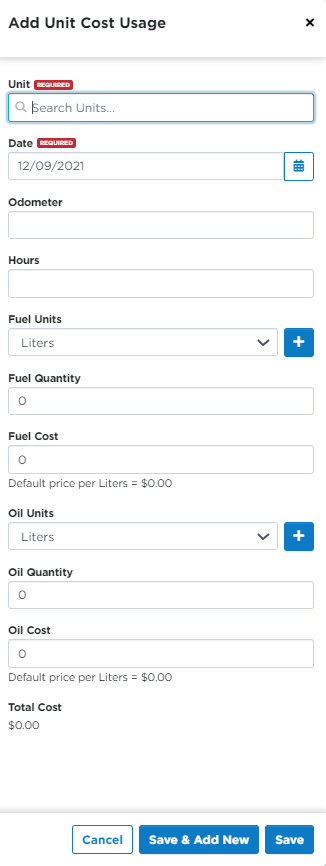
This article outlines how to use the Unit Cost Usage feature in Encompass® to track a vehicle’s operational costs, including fuel and oil. Users can access the Cost Usage tab from the Unit Maintenance section and either click the $ icon for a specific Unit or use the +Cost Usage button to add a new record. Required information includes the Date and Unit, with additional fields for detailed cost tracking. Entries can be saved individually or in sequence with Save & Add New.
Adding Cost Usage
From the unit Maintenance section, click on the Cost Usage tab.

You can either hover over a specific unit and click the "$" icon to open up the Cost Usage editor, OR click the orange +Cost Usage button.


Enter in the Date (required) and the Unit if you used the orange +Cost Usage button. (The unit will already be selected if you clicked Add Cost Usage directly from the specific unit.) Enter in the remaining fields as needed. Click Save or Save & Add New when finished.