DVIR Setup - 3. DVIR Defects
This article outlines how to manage and add DVIR (Driver Vehicle Inspection Report) Defects or Inspection Items in Encompass. Users navigate to Vehicle Management > Setup > Maintain Unit Maintenance Info > Maintain DVIR Defect to view the default list of Defects. Additional Defects can be added by clicking Add DVIR Defect Item, entering the Defect Name, and saving it. It is important to ensure the Show in List? option is checked so the Defect is available for use in DVIR Templates. This process allows companies to customize Inspection Items based on their specific Vehicle and Safety requirements.
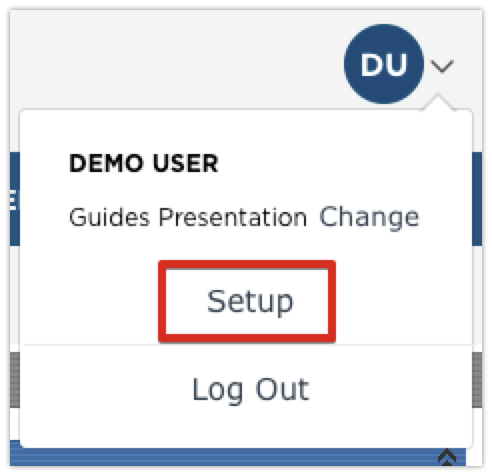
The list of available Inspection Items (or Defects) are found by going to Setup in the drop-down menu in the upper right hand corner from the Vehicle Management tab.
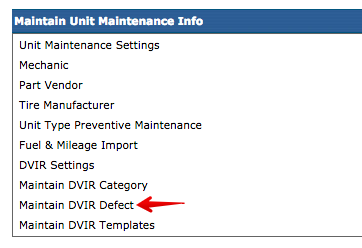
Scroll down to the Maintain Unit Maintenance Info box in the right column and click on Maintain DVIR Defect.
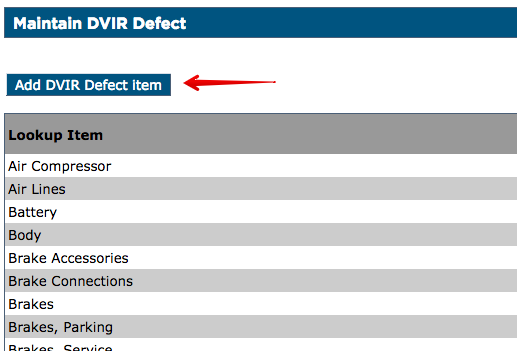
Encompass already has a list of defects, but additional items can be added to it. Click Add DVIR Defect Item at the top of the list.
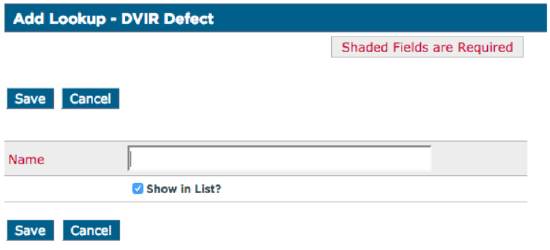
Enter the name of the inspection item and click Save. Make sure that Show in List? is checked. If it is unchecked, this will not be an available inspection item to add to a template.