Skip to main content
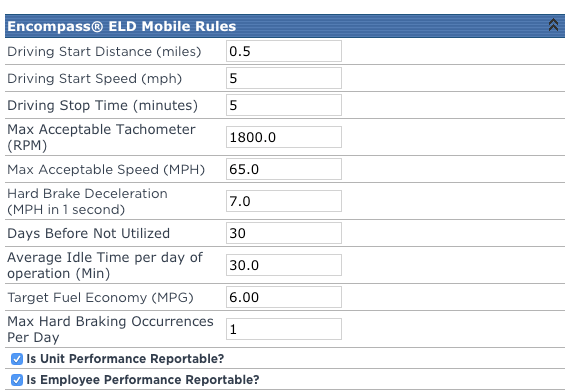 Driving Start Distance - If using AOBRD, this is the distance at which Encompass® ELD will take the driver out of On Duty-Not Driving into a Driving status.
- Driving Start Speed - If using ELD, this is the speed in which the vehicle must be traveling at a minimum for Encompass® ELD to take the driver out of On Duty-Not Driving into a Driving status.
- Driving Stop Time - Applies to both AOBRD and ELD. Consecutive time in which the vehicle must remain stationary in order to end a driving segment and take a driver out of a Driving status and place them into On Duty-Not Driving (this status change will be effective retroactive to when they stopped moving).
- Max Acceptable Tachometer - If using Performance Management, this is the maximum value for an RPM reading before an alert is generated.
- Max Acceptable Speed - If using Performance Management, this is the maximum speed reading accepted until an alert is generated.
- Hard Brake Deceleration - If using Performance Management, this is the deceleration rate in which a Hard Braking Event is defined.
- Days Before Not Utilized - If using Performance Management, this the number of days in which an ELD does not report information before it is marked as not utilized and removed from utilization reports.
- Average Idle Time per day of operation - If using Performance Management, this is the maximum number of minutes a vehicle can report idling before an alert is generated.
- Target Fuel Economy - If using Performance Management, this is the goal MPH for units.
- Max Hard Braking Occurrences Per Day - If using Performance Management, this is the maximum amount of times a unit can report a hard braking event before generating an alert.
- Is Unit Performance Reportable? - If using Performance Management, this turns on report ability for units.
- Is Employee Performance Reportable? If using Performance Management, this turns on report ability for employees.
![]()


