Environmental Dashboard
The Module Dashboard is designed to bring Action Items to your attention. It is made up of 5 cards to help you manage program compliance, upcoming to-dos, and to watch your Waste Accumulation to ensure you stay compliant with your Generator Status.
Upcoming Action Items
This card displays open Tasks (To do, In Progress, Past Due) by Location or rolled up for All Locations (Default View). Automated Tasks generated from all Environmental features (Ex., Environmental Programs, HazWaste Accumulation, Tank Management) will appear in this card. Once the Task is marked Complete, the Action Item will be removed from the card.
All Tasks can be viewed by clicking VIEW ALL or downloaded using the Export button.

Monthly Accumulation
This card is driven by your acute and non-acute waste accumulation entries (by Location) for containers in the Accumulating Status. SQGs and VSQGs each have a limit to the amount of waste they can accumulate at any one Location, and the dial will turn red once the total accumulation hits 75% of the threshold to indicate your Location is getting close to that Generator Status limit.

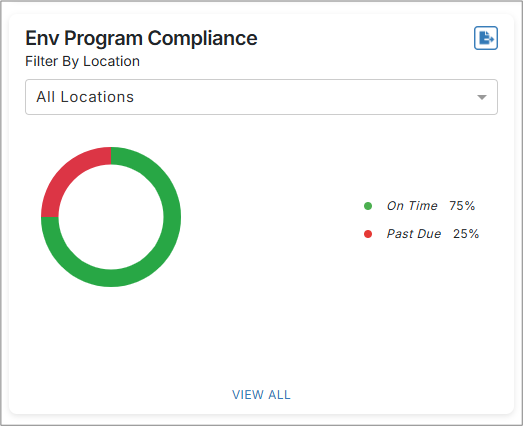
Environmental Program Compliance
This card provides a quick look at your “on-time” completion of your Program Tasks generated in the Environmental Programs feature. This metric is tracked by calendar year, and you can view your Program performance in total or by Location.
Central Accumulation Area - Required Ship Date
This card keeps you on top of upcoming required Ship Dates for containers in your CAAs. Required Ship Dates are automatically calculated once you add or move a container to the CAA, considering your Generator Status, the container Start Date and your distance from the disposal facility as defined by the EPA.
For reference:
| Generator Type | Time Limit in CAA |
| VSQG | No time limit - date will be blank |
| SQG | 180 days (270 days if >200 miles to facility |
| LQG | 90 days |

Satellite Accumulation Areas
This card is driven by your acute and non-acute waste accumulation entries for SAAs for containers marked in the Accumulating Status.
- For Acute Waste, we track your accumulation until you reach 1KG of waste; at which time you must move the container to your Central Accumulation Area (CAA).
- For Non-Acute Waste, we track your accumulation until you reach 55 gallons of waste; at which time you must move the container to your Central Accumulation Area (CAA).

Dashboard Content Features
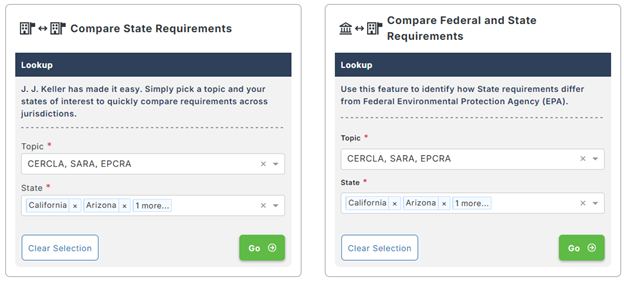
The State Agency Guide delivers state-specific environmental compliance information in 1 convenient location. This tool helps you quickly find environmental requirements and agency contacts by providing state-state and county-specific guidance.

Compare State Requirements/Compare State to Federal Requirements
The State Comparison and Compare State to Federal features are linked to the Reference Hub. The presentation within the Module filters down to only environmental topics to allow for quicker access. These features allow you to identify differences between states and between states and Federal requirements for Compliance Tasks like Permitting and Tier II Reporting.