


Environmental Incidents
This feature enables organizations to capture, track, and manage Environmental Incidents such as spills, releases, and related impacts. It provides a structured workflow with sections for general Incident Details, Release/Spill specifics, and Incident impacts. You can add Corrective Actions and generate an Incident Report to fulfill Environmental Incident Reporting requirements.
To record an Environmental Incident, click Add Incident.
Step 1 - Capture general information regarding the incident
This includes information such as the Incident Status, Incident Location, Incident Type, Date & Time, a Description of what occurred, and who was notified. Note: Case Numbers are automatically assigned using YYYY0000# sequential format.

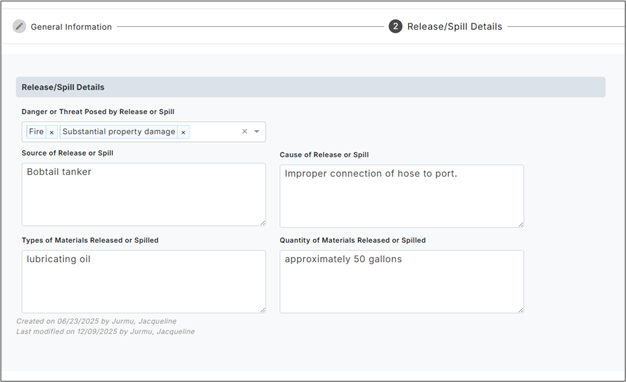
Step 2 - Capture information regarding release or spill
This includes entering the Source, Cause, Material Released, as well as the Quantity/Size of the Release.
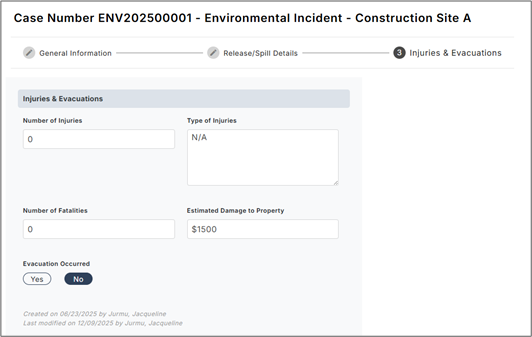
Step 3 - Enter any information related to any injuries & Evacuation
Capture count and type of Injuries as well as Fatalities and Estimated Cost. Once complete, save the record.
Once saved, Corrective Actions can be assigned and supporting documentation/images can be attached for a complete record of what occurred.
Finally, use the Print function to generate a Spill Report containing all the information you just entered, as well as the required Location information pulled in from Company Data.
