


Log Remarks
Log Remarks are located in the View Log area of the Encompass® ELD application.
 OR
OR 
Select the Log Remarks tab. On the status that requires the remark, tap Add Log Remark (Note: If the log has been submitted, any duty status changes that have occurred up to that point will not be able to have remarks added to them).
| ANDROID™ | IPHONE®/IPAD® |
|---|---|
|
|
The Log Remarks tab is located near the bottom of the screen.
|


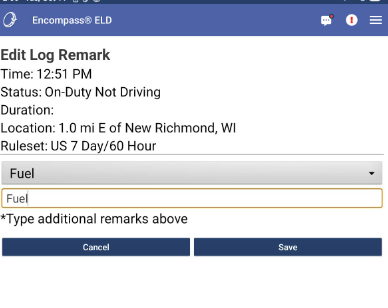
Use the drop-down for commonly used remarks, or use the text box below the drop-down to add a custom remark. Press Save.
| ANDROID™ | IPHONE®/IPAD® |
|---|---|
|
|
 |

Once saved, the remark can be Edited or Deleted.
| ANDROID™ | IPHONE®/IPAD® |
|---|---|
|
|
 |

