


How to Use Yard Moves
This article explains how Yard Move in Encompass® ELD lets Drivers record vehicle movement within a yard without it counting toward regulated drive time. Yard Move must be enabled in the Encompass back office before it appears in the mobile app.
Yard Move Upon Login
When logging into the Encompass® ELD application, the driver is prompted to select their duty status. The driver can immediately go into a Yard Move status upon login by toggling on Authorized Yard Move? beneath the On Duty Not Driving status. An appropriate Annotation as to why the Yard Move is taking place is also required.
| ANDROID™ | IPHONE®/IPAD® |
|---|---|
|
|
|
 OR
OR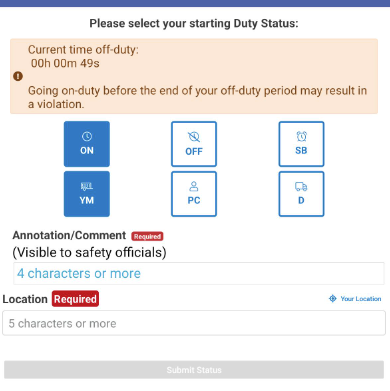
 OR
OR
The yard move status will then be indicated in the green status bar at the top.
 OR
OR
When in yard move, the clocks will still display on the screen when the vehicle is in motion, but the Driving Hours Available clock will be inactive and will not be counting down.

Yard Move While already logged in
If the driver isn't utilizing Yard Move until later in their day, they can choose this status from the Encompass® ELD dashboard. Tap on the Duty Status in the green bar at the top, or select Menu > New Status in the upper right corner.
 OR
OR


Ending yard move and starting regulating driving
There are two ways to do this:
1. When the vehicle is turned off, it will end yard move. The next time the vehicle is started up and moved, it will put the driver into an on-duty driving status.
2. Go back into the New Status screen and uncheck the box for Yard Move. Press OK.