


Virtual vs. Flat Company Structure
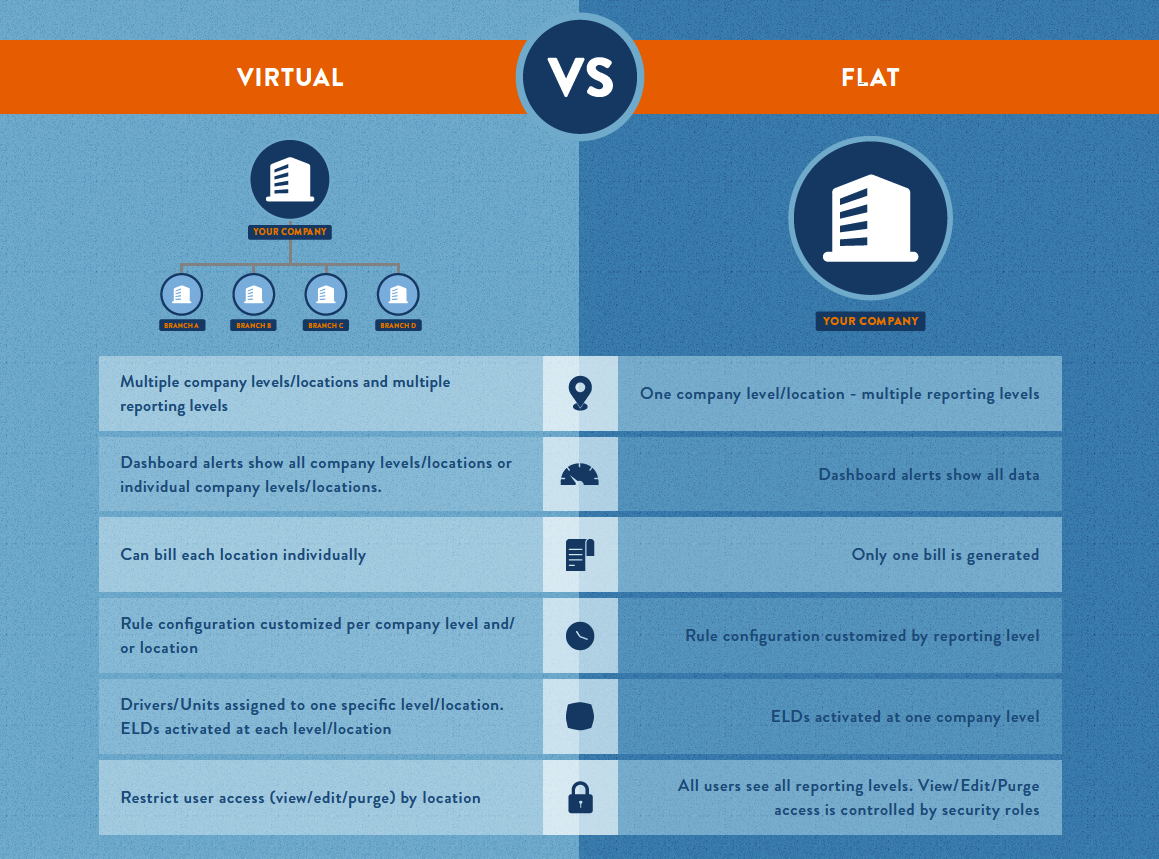
This article explains the differences between Virtual and Flat Company Structures within Encompass®. A Virtual Structure mimics a corporate hierarchy, allowing multiple Reporting Levels and Location-specific Dashboards, Rules, and ELD Activations, enabling users to view either the entire company or specific Locations. In contrast, a Flat Structure maintains all data in 1 Location, with Rule Settings applied by Reporting Level rather than by Location. User access in a Virtual Structure is assigned by Location and Security Role, whereas in a Flat Structure, Security Roles apply across all Reporting Levels. Understanding these structures is essential for configuring Dashboards, Rules, and User Permissions appropriately.
What does this mean?
- A virtual structure can mimic corporate/company hierarchy, with the ability to add additional reporting levels. Flat structure allows reporting levels, but all data is held in one location.
- A virtual structure allows users to see one dashboard for entire company, or drilling down to a specific company level/location. This allows a user to see one specific company level/location.
- In a virtual structure, rule settings can be configured by company level/location and/or reporting levels. In a flat structure, rule settings are configured by reporting levels.
- In a virtual location, ELDs are activated at each company level/location. If drivers frequently move between company levels/locations, Encompass® ELD will need to be configured to the new location for each move.
- In a virtual structure, users are assigned access by location as well as security roles which determine capabilities within (view/edit/purge). In a flat structure, users are assigned security roles for all reporting levels.