


Geotab: View Live Video
The Live Video feature in VideoProtects allows users to view real-time road-facing camera footage, with driver-facing views restricted for privacy reasons. Access is managed through VideoProtects > Configuration > Device Associations, where an online camera can be selected to initiate a live stream. Optional audible Alerts can notify Drivers when live streaming starts and ends. Each device is limited to 10 minutes of live footage per calendar month, with the remaining time displayed during streaming. The live session continues until the user selects “Stop & Close.”
Steps
Go to VideoProtects> Configuration > Device Associations.

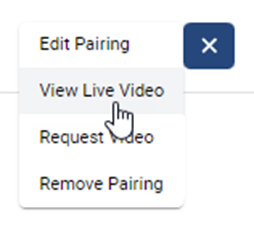
Locate the desired vehicle/camera pairing and click the ellipsis (three dots). Select View Live Video. The camera must be Online to use the Live Video functionality.

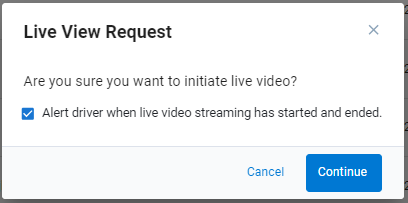
An optional alert can be sent to the driver to notify them when the live video streaming has started and ended. If the checkbox is selected when the live video stream is initiated, the camera will audibly announce to the driver that “A live video stream has started on the road-facing camera.” When the live video stream is closed, a similar announcement will come from the camera (ie. “A live video stream has ended on the road-facing camera”).
Click Continue when ready to initiate the live video.
Another modal will display to indicate that the live footage is ready for viewing. Each device is limited to 10 minutes of live footage per calendar month. The modal will show the monthly time limit as well as the remaining amount of the time for the selected device. Click the Watch Live Footage button to continue to the video livestream.

A countdown of the remaining time for the month will appear in the bottom left corner of the screen. The live video footage will continue to play until the ‘Stop & Close’ button is clicked.
