


TMC Expert Help
This article explains how to use the Expert Help feature in the Training Management Center (TMC) to get answers to compliance-related questions from J. J. Keller® Subject Matter Experts. From the Resources tab, users can submit a new request via a form, with an average response time of about 3 hours. Users can view their submission history and previous answers through the Requests dropdown or the My Request History link on the Expert Help dashboard. This feature provides timely expert guidance to support compliance and operational decisions.
From the Resources tab, click Reference Hub.

Once you're brought to the Reference Hub, under Expert Help, click the blue button that states Meet the Experts!

On the Expert Help page, you'll be presented with 3 options to communicate with our experts:
- Message an Expert: Stumped by a compliance question? Message our experienced experts for answers within 1 business day.
- Schedule a Call/Video Meeting: Easier to talk through it? Our experts are here for that, too. We'll send you options of times to connect to fit your schedule.
- Submit a Research Request: Need help with a complex issue? For complex inquiries, our experts conduct thorough research and generate detailed reports to guide you and your organization.

To submit a new question, click Send a Message.

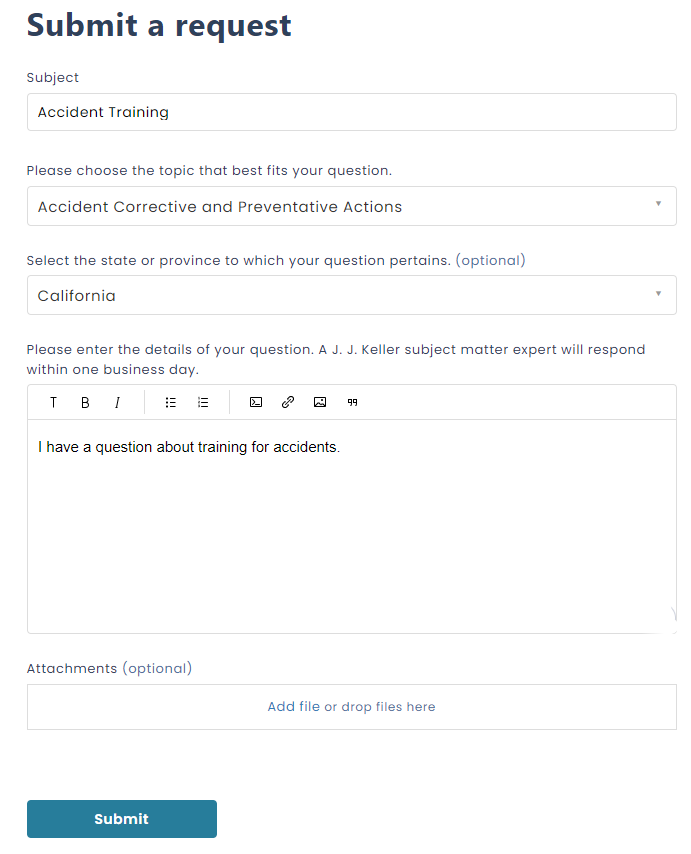
Fill out the request form and a J.J. Keller subject matter expert will respond. The average response time is about 3 hours.
To view your submission history and answers to your requests, go to the dropdown next to your name and click Requests.

You can also access your requests by clicking View Your Message History at the top of the Expert Help Dashboard.
