


Creating Off Duty Logs
This article explains how the Encompass® ELD application alerts Drivers to missing logs and allows them to create Off Duty logs for unlogged days within the past 7 days. Upon login, Drivers are prompted to create these logs, or they can do so manually through the System Menu by navigating to Records → Download Records and selecting the applicable dates. The process differs slightly between Android™ and iPhone®/iPad®, particularly in how downloads are confirmed. If logs are needed for dates outside the allowed range, Drivers must contact their Administrator to have them entered in the Encompass back-office system.
Off Duty Log Alert Upon Login
Upon logging into the application, a check will be made to see if there are missing logs. If there are any missing logs, it will prompt the driver to create off-duty logs for those days. To create the off-duty logs, select Yes.

Create Off-Duty Logs via Menu
From the application dashboard, select Menu in the upper right hand corner. Then, tap System Menu.
| ANDROID™ | IPHONE®/IPAD® |
|---|---|
|
|
|
 OR
OR

 OR
OR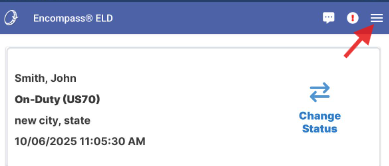

Select Records.
| ANDROID™ | IPHONE®/IPAD® |
|---|---|
 |
 |
Select Download Records.
| ANDROID™ | IPHONE®/IPAD® |
|---|---|
 |
 |
Select the checkbox/click on the appropriate days to create off-duty logs for.
| ANDROID™ | IPHONE®/IPAD® |
|---|---|
 |
 |
Once all days have been selected to create an off-duty log for, click Download. (On iPhone/iPad, first click the button in the upper right corner and then select Download.)
| ANDROID™ | IPHONE®/IPAD® |
|---|---|
 |
 |
If you are unable to create off duty logs further than what the app is allowing, please reach out to your administrator. The remaining off duty logs may need to be entered by the administrator in the Encompass "back office".