


Unit Performance Management Settings
This article explains how to configure Performance Management Settings in the J. J. Keller® Encompass® system to monitor Vehicle and Driver Performance. From the Company Level Listing under Settings, users can edit Encompass® ELD Mobile Rules to define thresholds for RPM, Speed, Braking Events, Idle Time, and Fuel Economy. It also includes options to mark Units as Not Utilized after inactivity and to enable Performance Reporting for both Units and Employees. These Settings help organizations track operational efficiency, enforce safety standards, and generate Performance Alerts.
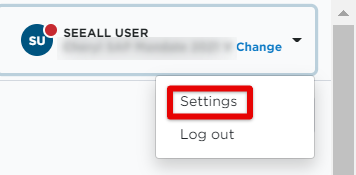
Start by going to Settings in the drop-down in the upper right hand corner.
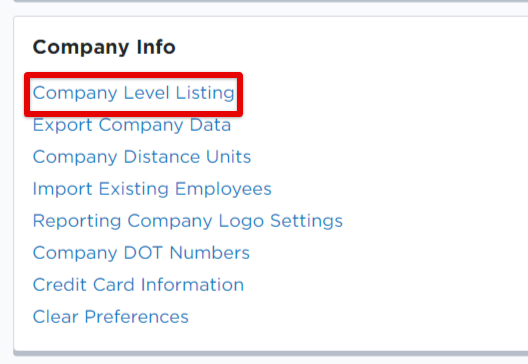
Click on Company Level Listing in the Company Info box.
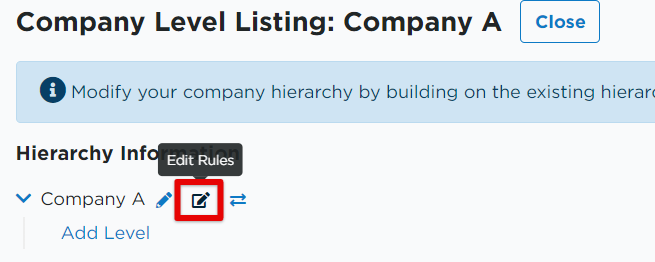
Next to the appropriate company level, find the 'box with pencil' icon; click to Edit Rules.
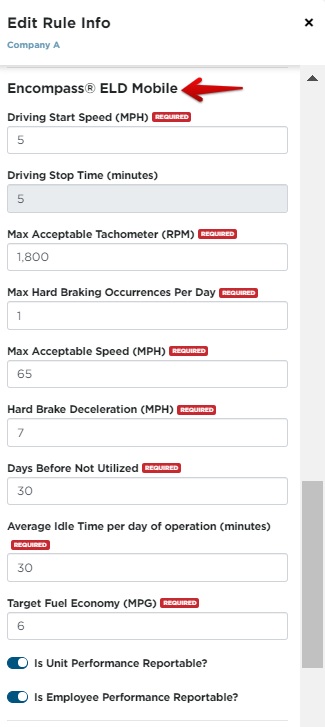
Scroll down to the section titled Encompass® ELD Mobile Rules. Driving Start Speed, and Driving Stop Time are all settings regarding Hours of Service. The remaining settings are for Performance Management.
- Max Acceptable Tachometer (RPM)- Maximum value for an RPM reading before an alert is generated
- Max Hard Braking Occurrences per Day - Maximum amount of times a unit can report a hard braking event before generating an alert
- Max Acceptable Speed - Maximum speed reading accepted until an alert is generated
- Hard Brake Deceleration - Deceleration rate in which a Hard Braking Event is defined
- Days Before Not Utilized - The number of days in which an ELD does not report information before it is marked as not utilized and removed from utilization reports
- Average Idle Time per day of operation - Maximum number of minutes a vehicle can report idling before an alert is generated
- Target Fuel Economy - Goal MPH for units
- Is Unit Performance Reportable? - Turns on report ability for units
- Is Employee Performance Reportable? - Turns on report ability for employees
Click Save.